RAT 5
Run your 7 Days to Die server with less work and more control.
Management, monitoring, automation, backups, and Discord integration, all from one approachable desktop application.
Run your 7 Days to Die server with less work and more control.
Management, monitoring, automation, backups, and Discord integration, all from one approachable desktop application.
Download the client and server

What Is RAT 5?
RAT 5 is a server-management platform built for 7 Days to Die administrators.
Instead of juggling configuration files, console windows, scheduled scripts, and separate utilities, RAT gives you a central place to manage your server. Routine jobs can be automated, important activity can be monitored, and trusted staff can help without receiving unrestricted access to the host machine.
You do not need to be a programmer to benefit from RAT. Start with its visual management tools, then explore automation when you are ready.
Manage Your Server from One Place
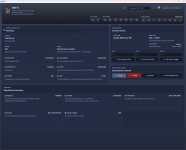
RAT provides a clear dashboard for checking your server and handling common administrative tasks.
- Start, stop, and restart the game server.
- See whether the server is running and responding.
- View connected players and tracked player information.
- Send console commands without opening a separate telnet client.
- Receive clear warnings when the server stops responding or exits unexpectedly.
RAT continuously watches the connection and can recover from interruptions automatically, helping reduce the need for manual intervention.
Configure with Confidence
Edit your game-server settings through an organized interface instead of searching through a large XML document.
- Browse settings with readable names and explanations.
- Import an existing
serverconfig.xmlto get started quickly. - Review pending changes before applying them.
- Keep unsaved edits when the server reports an updated configuration.
- Receive a warning before accidentally closing or leaving a page with unsaved work.
RAT helps make configuration changes understandable without taking control away from experienced administrators.
Automate Repetitive Work
RATScript lets you build server automation around schedules and real server activity.
Automations can respond when:
- The game server starts, stops, restarts, or becomes ready.
- A player joins for the first time.
- A blood moon begins or ends.
- A backup starts, completes, or fails.
- A matching message appears in the server console.
- Activity occurs in a connected Discord server.
Use these events to send announcements, run commands, create Discord alerts, maintain leaderboards, or perform other routine actions automatically.
The built-in script editor includes templates, autocomplete, validation, and an integrated reference guide. You can begin with a provided example and customize it instead of starting from an empty page.
Schedule Tasks Ahead of Time
Create scheduled jobs for maintenance, announcements, restarts, and other recurring work.
- Run tasks hourly, daily, weekly, or on a custom schedule.
- Enable or disable a task without deleting it.
- Run a scheduled task immediately when needed.
- Use countdown announcements before planned restarts.
- Send announcements in-game, through Discord, or through both.
Once configured, RAT handles the schedule so you do not have to be online for every routine task.
Connect Your Server with Discord
RAT can connect server automation directly to your Discord community.
- Send regular messages and rich embedded announcements.
- Respond to Discord messages, edits, deletions, and reactions.
- Reply to messages or add reactions automatically.
- Pin, unpin, edit, or delete messages through controlled automations.
- Route messages through configured Discord channels.
- Build alerts from game-server events and console activity.
This makes Discord more than an announcement destination—it can become an active part of your server-management workflow.
Protect Your World with Managed Backups
Create and manage server backups without relying on a separate collection of scripts.
RAT tracks backup activity and can trigger automation when a backup succeeds or fails. That means administrators can receive timely notifications instead of discovering a failed backup only when it is needed.
Give Staff the Access They Need
Not every moderator needs full control over the server machine.
RAT supports separate operator accounts, customizable roles, and individual permissions. Owners can decide who may view information, manage players, change settings, work with events, or perform sensitive server operations.
- Create individual accounts for staff members.
- Assign roles based on responsibility.
- Customize the permissions attached to each role.
- Enable, disable, or update accounts from a dedicated administration area.
- Avoid sharing one administrator password with the entire team.
This makes RAT suitable for both solo administrators and larger staff teams.
Understand Your Community
RAT tracks useful player information and makes it available to administrators and automations.
Create player leaderboards using statistics such as:
- Level and score
- Zombie and player kills
- Deaths
- Total play time
- RAT credits
Leaderboards can be formatted for automated announcements, Discord posts, community competitions, or regular status updates.
Designed for Real Server Administration
RAT is built to support long-running servers rather than one-time setup.
- Windows service support allows RAT Server to start automatically with Windows.
- Connection monitoring detects stalled server communication and attempts recovery.
- Secure credential storage keeps remembered client logins protected by the operating system.
- Operator permissions reduce the need to expose the server host to every staff member.
- Integrated references explain configuration options, scripting functions, and available event data.
You remain in control while RAT handles the repetitive work around you.
Spend Less Time Maintaining Your Tools
RAT brings the pieces of server administration together: configuration, monitoring, backups, staff access, scheduling, scripting, Discord, and player information.
Start with the dashboard and visual tools. Add automations as your needs grow.
Let RAT handle the routine work so you can focus on running your community.
RAT brings the pieces of server administration together: configuration, monitoring, backups, staff access, scheduling, scripting, Discord, and player information.
Start with the dashboard and visual tools. Add automations as your needs grow.
Let RAT handle the routine work so you can focus on running your community.